Xtream Codes is an IPTV authentication API that uses three credentials — server URL, username, and password — to deliver live channels, video-on-demand, TV series, and EPG data in a single authenticated connection. Xtream Codes replaces the static M3U URL model with an API-driven approach that keeps credentials stable throughout a subscription period and delivers complete content libraries in one call rather than a flat text file.
Despite its name being tied to a Greek company that shut down in 2019, the Xtream Codes API specification survived and became the de facto industry standard. In 2026, approximately 80% of professional IPTV middleware platforms implement Xtream Codes-compatible endpoints, making it the most widely supported authenticated IPTV protocol after M3U.
This guide covers the format at four levels: what Xtream Codes is and how it evolved, how the underlying API technically works, how to set it up in any compatible IPTV player, and how to fix the recurring errors users encounter.
Xtream Codes at a Glance
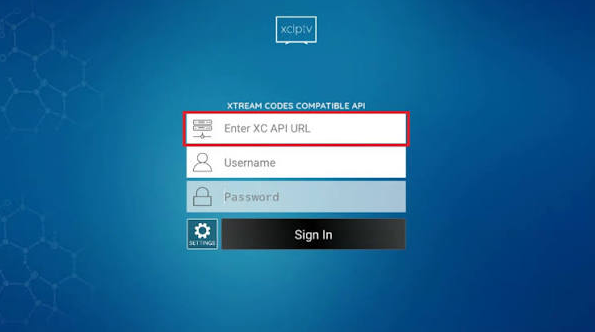
- Type: Authenticated IPTV API (not a file format)
- Credentials required: Server URL, username, password (three fields)
- Typical port: 8080 (also 25461, 80, 443, or custom)
- Protocol: HTTP or HTTPS
- Response format: JSON
- Content types delivered: Live TV, VOD movies, TV series, EPG, catch-up TV
- Cost: Free open specification; credentials come with any paid IPTV subscription
- Credential stability: Full subscription period (no 24-48 hour rotation like M3U)
- Supported players: TiviMate, Perfect Player, Smarters Pro, IPTV Smarters, GSE Smart IPTV, OTT Navigator, iMPlayer, XCIPTV
- Unsupported by: VLC, IINA, Kodi (natively), most generic media players
- Provider adoption: Approximately 80% of professional IPTV services in 2026
Best for: IPTV subscribers who want stable credentials that never rotate, complete VOD and series libraries alongside live TV, and automatic EPG loading without manual XMLTV configuration.
What Is Xtream Codes?
Xtream Codes is an authenticated IPTV connection method that requires three credentials (server URL, username, password) instead of a single M3U URL. When an IPTV player submits these credentials to the provider’s server, the server validates the account, returns the full channel list, VOD catalog, TV series library, and EPG data in a structured JSON response, and opens authenticated stream sessions on demand.
The name “Xtream Codes” originates from Xtream Codes Ltd., a Greek company that developed IPTV middleware software widely deployed between 2015 and 2019. In September 2019, Italian and Greek authorities conducted a coordinated raid known as “Operation Perfect Storm” that shut down the company and seized its infrastructure. Roughly 5,000 IPTV providers using Xtream Codes middleware were disrupted overnight.
The API specification itself survived because competing middleware platforms — including Ministra (formerly Stalker), XUI.one, XtreamUI, and various forks of the original codebase — had already adopted identical API endpoint structures. Today, “Xtream Codes” refers to the API format and specification, not the original company. Any IPTV player that implements the API can connect to any provider running compatible middleware, regardless of vendor.
Three core properties make Xtream Codes the modern IPTV authentication standard:
- Stable credentials: The three fields remain valid for the full subscription period without rotation
- Complete content delivery: Live TV, VOD, series, and EPG arrive in a single authenticated session
- Session control: Providers can enforce simultaneous connection limits at the account level, which M3U cannot
How the Xtream Codes API Technically Works
The Xtream Codes API operates as a REST-style HTTP API. IPTV players make requests to specific endpoints on the provider’s server, receive JSON responses, and use returned stream URLs to open playback sessions. Understanding the endpoint structure explains why the format is so flexible and why troubleshooting requires knowing which endpoint fails.
Core API endpoints:
/player_api.php— Main API endpoint. Acceptsactionparameters likeget_live_categories,get_live_streams,get_vod_categories,get_vod_streams,get_series,get_series_info,get_short_epg,get_simple_data_table/xmltv.php— Returns the full XMLTV EPG file for the account/get.php— Backwards-compatible M3U generation endpoint; acceptstype=m3u_plusandoutput=tsparameters/panel_api.php— Reseller and admin panel endpoint (not used by end-user players)
Example authentication request:
GET http://provider.example.com:8080/player_api.php?username=USER&password=PASSExample authentication response (simplified):
json
{
  "user_info": {
    "username": "USER",
    "password": "PASS",
    "auth": 1,
    "status": "Active",
    "exp_date": "1798761600",
    "max_connections": "2",
    "active_cons": "1"
  },
  "server_info": {
    "url": "provider.example.com",
    "port": "8080",
    "https_port": "8443",
    "server_protocol": "http",
    "timezone": "Europe/London"
  }
}
Example live stream URL structure returned by the API:
http://provider.example.com:8080/live/USER/PASS/1234.ts
http://provider.example.com:8080/USER/PASS/1234
The .ts extension delivers MPEG-TS streams (widely supported, low latency). Some servers also deliver .m3u8 HLS streams at endpoints like /live/USER/PASS/1234.m3u8 for adaptive bitrate playback.
Example VOD stream URL:
http://provider.example.com:8080/movie/USER/PASS/5678.mp4Example series episode stream URL:
http://provider.example.com:8080/series/USER/PASS/9012.mkvThe player never handles the raw JSON directly for the user. The IPTV player parses the response, builds the channel grid, downloads logos and metadata, and stores the stream URL patterns so that opening a channel triggers only a direct HTTP request to the stream endpoint.
Xtream Codes vs M3U vs Stalker Portal
IPTV credentials arrive in three main formats. Xtream Codes solves problems M3U cannot but requires player-side API support.
M3U:
- Single URL pointing to a static text file
- No authentication API; credentials embedded in URL string
- Works in every IPTV player including VLC and Kodi
- URL may rotate every 24-48 hours on some providers
- VOD included only if provider generates
type=m3u_plusvariant - EPG requires separate XMLTV URL
Xtream Codes:
- Three-field authentication (server URL, username, password)
- Live TV, VOD, series, and EPG delivered in one authenticated session
- Credentials stable for full subscription duration
- Not supported by VLC, IINA, generic media players, or Kodi natively
- Supports session limits (max concurrent connections)
- Approximately 80% provider adoption in 2026
Stalker Portal (Ministra):
- Authentication via device MAC address only
- Standard on MAG boxes, Formuler devices, and dedicated Stalker apps
- Cannot easily migrate between devices (MAC-locked)
- Richest EPG and native TV-like interface
- Approximately 15% provider adoption
Comparison table:
| Feature | M3U | Xtream Codes | Stalker |
|---|---|---|---|
| Credential count | 1 URL | 3 fields | MAC address |
| Credential stability | May rotate 24-48h | Full subscription | Full subscription |
| VOD delivery | If in file | Full library | Full library |
| Series delivery | No | Full library | Full library |
| EPG auto-load | Separate URL | Automatic | Automatic |
| Session limits | No | Yes | Yes |
| Universal player support | Yes | Modern players only | MAG/Formuler apps |
| Editable by user | Yes | No | No |
| 2026 provider adoption | ~90% | ~80% | ~15% |
For most subscribers in 2026, using Xtream Codes when the provider offers it delivers the smoothest experience. M3U remains the fallback when the player does not support Xtream Codes (VLC, IINA, older Kodi builds).
What Xtream Codes Delivers in a Single Login
A single Xtream Codes authentication call returns four content categories simultaneously.
Live TV channels:
- Complete channel list from the subscription
- Category groupings (Sports, News, Movies, Kids, adult categories, country-specific groups)
- Channel logos loaded from the provider’s metadata
- EPG data matched automatically to channel IDs
- Catch-up TV markers where the provider supports rewind
VOD (Video on Demand) movies:
- Full movie library included in the subscription tier
- Poster artwork sourced from TMDb or provider metadata
- Descriptions, cast, genre tags, and release year
- Multiple quality streams (SD, HD, 4K) where available
- Playback resume where the player supports it
TV series with full episode structure:
- Series titles, poster art, and descriptions
- Season and episode breakdown
- Episode air dates, titles, and per-episode descriptions where the provider includes them
- Season-by-season navigation similar to a private streaming service
EPG (Electronic Program Guide):
- Full XMLTV data delivered via
/xmltv.php - Now-playing and upcoming program information
- Program descriptions and categories
- Automatically matched to channels without manual configuration
How to Set Up Xtream Codes in Any IPTV Player
The Xtream Codes setup process is nearly identical across every compatible player. Menu names vary slightly, but the pattern is the same: open playlist settings, choose Xtream Codes as the input type, enter the three credentials, save.
TiviMate setup:
- Open TiviMate and go to Settings → Playlists → Add playlist
- Select Enter login
- Enter the server URL (including port, e.g.,
http://provider.example.com:8080) - Enter username and password
- Tap Next and wait for parsing
Perfect Player setup:
- Open Perfect Player and tap the gear icon
- Go to General → Playlist
- Choose XC (Xtream Codes) as playlist type
- Enter server, username, password
- Save and assign a playlist name
IPTV Smarters Pro / Smarters Player Lite:
- Open the app and tap Add User
- Select Login with Xtream Codes API
- Enter Any Name (label), username, password, and URL
- Tap Add User
GSE Smart IPTV:
- Open GSE and tap the menu icon
- Go to Xtream Codes API
- Tap the + icon
- Enter playlist name, URL, username, password
- Tap Add
Universal setup checklist:
- Server URL format must include protocol (
http://orhttps://) and port (e.g.,:8080) - Username and password are case-sensitive
- Extra spaces before or after credentials cause authentication failures — copy directly rather than retyping
- Some providers require
http://nothttps://, and vice versa — the welcome email specifies
Common Xtream Codes Errors and Fixes
Xtream Codes has a small set of recurring error patterns. Recognizing which endpoint fails narrows down the cause.
Error: “Invalid credentials” or “Authentication failed”
- Username or password contains extra whitespace (most common cause)
- Password uses a special character the player doesn’t URL-encode correctly
- Subscription has expired — check the
exp_datein the account portal - Provider migrated servers without notification — request updated URL
Error: “Cannot connect to server”
- Wrong port number — verify against the welcome email
- HTTP vs HTTPS mismatch — try switching the protocol
- ISP blocking the port — test with a VPN or a different network
- Provider server temporarily down — check provider status page or Telegram
Error: “Max connections reached”
- Account is being used on more devices than the subscription allows
- Log out of unused devices in the player settings
- Contact provider to increase the
max_connectionslimit on the account
Error: Channels load but streams fail to play
- Individual stream server is offline (provider issue, not credential issue)
- Geoblocking on the specific stream — try a VPN
- Player codec unsupported for the stream format — try an alternative external player
Error: EPG missing or empty
- Provider does not populate
/xmltv.phpcorrectly - Manual XMLTV URL can be added in most players as a fallback
- EPG can lag several hours behind on first load; wait or refresh
Error: VOD or series section empty
- Provider subscription tier does not include VOD/series
- Player caches an old empty response — force a manual refresh
- Provider stores VOD on a separate server that failed to respond
Error: Streams play but freeze after 30-60 seconds
- Buffer size too small in player settings — increase to 5-10 seconds
- Network stability issue — test with wired Ethernet
- Server bandwidth throttled during peak hours
Xtream Codes Security Considerations
Xtream Codes is more secure than M3U in three ways, but not without limitations users should understand.
Advantages over M3U:
- Server-side authentication prevents casual link sharing
- Session limits enforce maximum concurrent connections
- Server can revoke access instantly by disabling the account
- Provider knows which device connects and can log usage
Limitations:
- Most Xtream Codes deployments use plain HTTP, not HTTPS — credentials travel unencrypted
- Username and password are stored in the player’s local database, often unencrypted
- Server URL leaks the provider identity to anyone with network access
- No two-factor authentication in the specification
Recommended precautions:
- Prefer providers offering HTTPS endpoints (port 443 or 8443)
- Use a VPN when connecting on public Wi-Fi
- Never share credentials in screenshots — the three fields together compromise the account
- Change the account password if credentials are exposed
Is Xtream Codes Legal?
The Xtream Codes API specification itself is a legal open technical standard, similar to HTTP or JSON. Middleware software implementing the API (Ministra, XUI.one, XtreamUI) is legal to install and operate.
Legality depends on the IPTV service the credentials authenticate against. Licensed IPTV distributors using Xtream Codes middleware are legal. The original Xtream Codes Ltd. was shut down in 2019 not because the API was illegal, but because the company knowingly facilitated large-scale rebroadcast of pay-TV content without licensing. The API technology outlived the company because the specification itself carries no infringement.
Frequently Asked Questions
Is Xtream Codes still working in 2026?
Yes. The Xtream Codes API is more widely adopted in 2026 than at any point before, running on Ministra, XUI.one, XtreamUI, and various forks of the original codebase. Approximately 80% of professional IPTV providers implement compatible endpoints.
Does Xtream Codes cost anything?
The API specification is free and open. Xtream Codes credentials come bundled with any paid IPTV subscription — subscribers do not pay extra for Xtream Codes access separately from their subscription cost.
Can Xtream Codes and M3U be used simultaneously?
Yes. Most IPTV players (TiviMate, Perfect Player, Smarters Pro) support multiple playlists of different types simultaneously. A subscriber can load an M3U playlist for one provider and Xtream Codes credentials for another in the same player.
What is the difference between Xtream Codes and M3U?
M3U is a static text file with stream URLs; Xtream Codes is an authenticated API with three credential fields. M3U works in every player but may rotate every 24-48 hours. Xtream Codes stays stable for the full subscription but requires player-side API support.
Which IPTV players support Xtream Codes on iPhone?
IPTV Smarters Pro, GSE Smart IPTV, iMPlayer, Ott Player, TiviMate Companion (limited), and IPTV Extreme Pro all support Xtream Codes on iPhone and iPad through the App Store.
Why did the original Xtream Codes company shut down?
Xtream Codes Ltd. shut down in September 2019 following “Operation Perfect Storm,” a coordinated law enforcement action by Italian and Greek authorities targeting unauthorized IPTV distribution networks. The company was accused of knowingly enabling large-scale copyright infringement. The API specification survived because competing middleware platforms had already adopted the endpoint structure.
Can Xtream Codes deliver 4K streams?
Yes. The API is stream-format agnostic. Providers deliver 4K UHD streams via MPEG-TS (.ts) or HLS (.m3u8) URLs returned by the API. Playback quality depends on the provider’s source bitrate, the user’s internet bandwidth (25+ Mbps recommended for 4K), and the player’s decoder support.
Are Xtream Codes credentials safe to store on my device?
Most players store credentials in the local application database. Encryption varies by player. Best practice is to keep the device itself secured (screen lock, disk encryption on desktop) and to never share credentials or screenshots. Providers can regenerate credentials from the member portal if they are compromised.
Do I need a VPN with Xtream Codes?
A VPN is not required for the API to function but is recommended for two reasons: many providers use HTTP (unencrypted) endpoints, and some ISPs throttle IPTV traffic. A VPN encrypts the credential exchange and often improves streaming stability.