Perfect Player remains one of the most requested IPTV front-ends among Firestick and Android TV users who prefer a lightweight alternative to Kodi. The sections below walk through everything needed to setup Perfect Player correctly, from sideload to playlist integration and interface tuning.
Perfect Player at a Glance
- Price: Free (ad-supported); Perfect Player Pro one-time purchase approximately $2.99 on Google Play
- Supported devices: Amazon Firestick, Fire TV Cube, Android TV, Google TV, NVIDIA SHIELD, MECOOL boxes, Android phones and tablets, Windows
- Free trial: Not applicable — the free version is fully functional with ads
- Playlist support: M3U, M3U8, and Xtream Codes API
- EPG format support: XMLTV and JTV
- Multi-language: English, Spanish, Portuguese, Russian, Greek, Ukrainian
- Availability: Not on Amazon Appstore — sideload required for Firestick
Perfect Player is a lightweight IPTV player developed by Niklabs. Perfect Player pairs with any IPTV subscription that provides an M3U link or Xtream Codes credentials, then handles channel playback, EPG rendering, and favorites management inside a clean grid interface.
What Perfect Player Does Well
Key features that make Perfect Player setup worthwhile:
- Dual playlist for Perfect Player support covering both M3U/M3U8 URLs and Xtream Codes
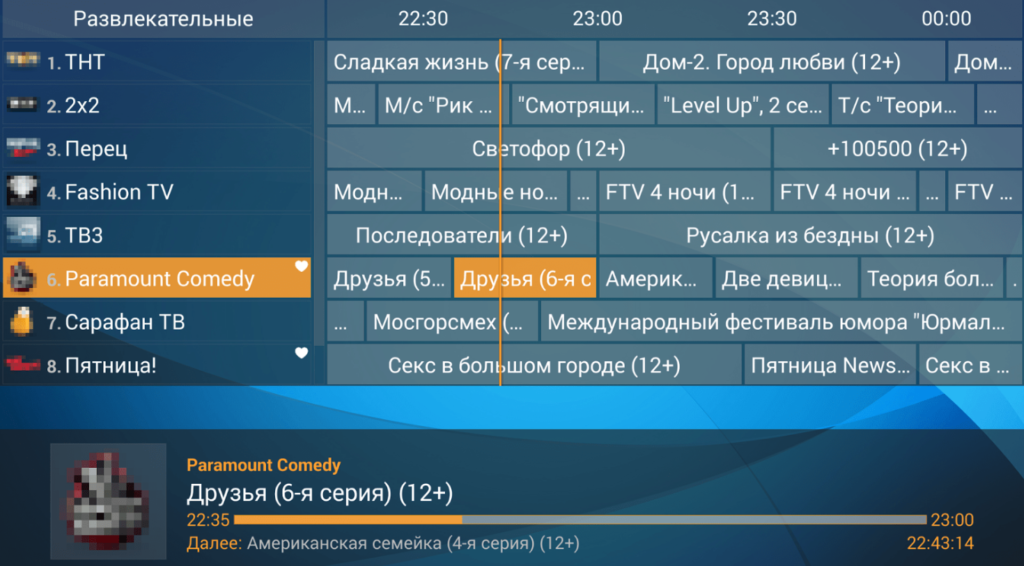
- EPG integration with XMLTV and JTV grids for a real program guide
- Channel favorites with quick-access filtering
- Parental lock on individual channels
- Multiple playlists stored simultaneously with switch-on-demand
- Hardware and software decoding toggles per stream
- Adjustable aspect ratio, buffer size, and user-agent within Perfect Player settings
- Custom logos and channel group filtering
Best for: IPTV subscribers on Firestick or Android TV who want a no-frills player with reliable M3U and Xtream Codes support without the overhead of Kodi.
How to Install Perfect Player on Firestick
Perfect Player is not listed in the Amazon Appstore, so the Firestick installation runs through the Downloader app. Before starting the Perfect Player setup process, enable Apps from Unknown Sources under Settings → My Fire TV → Developer Options → Install Unknown Apps → Downloader.
Once Downloader has permission, the sideload runs like this:
- Open Downloader and select the URL bar
- Enter Downloader code 929878 and press Go
- Wait for the Perfect Player APK to finish downloading
- Select Install, then Done once the installation completes
- Delete the leftover APK file to free storage
On Firestick devices where Developer Options does not appear, open Settings → My Fire TV → About, highlight the device name, and click the OK button seven times to unlock it.
How to Install Perfect Player on Android TV or Google TV
Android TV and Google TV devices (NVIDIA SHIELD, Chromecast with Google TV, MECOOL, Onn boxes) can pull Perfect Player directly from the Google Play Store, which skips the sideload entirely. Search “Perfect Player IPTV” inside Google Play and select Install. The Pro version, which removes ads, is also available as a separate in-app purchase for approximately $2.99.
How to Setup Perfect Player with an M3U Playlist
The Perfect Player setup process depends on one of two credential types from an IPTV provider: a full playlist for Perfect Player in M3U/M3U8 format, or Xtream Codes (server URL, username, password). Both live inside the welcome email from most IPTV services.
Steps to load a playlist Perfect Player will read from:
- Launch Perfect Player and tap Accept on the disclaimer
- Open the Settings gear icon in the top-right corner
- Select General, then choose Playlist
- Pick M3U or XC (Xtream Codes) depending on the credentials provided
- Paste the M3U URL, or enter Xtream Codes server + username + password
- Assign a playlist name and confirm with OK
- Wait for the “Playlist update started” notification in the corner
Once the update finishes, Perfect Player populates the channel grid and playback becomes available. Multiple playlists can coexist, which suits users juggling more than one IPTV subscription.
How to Add an EPG in Perfect Player
An electronic program guide turns the raw channel list into a proper TV grid. Perfect Player reads XMLTV and JTV feeds, which most IPTV providers publish alongside the M3U URL.
To load the EPG, open Settings → General → EPG, paste the XMLTV URL supplied by the provider, and confirm. Perfect Player will fetch the guide data on the next refresh and display program titles, timing, and descriptions inside the channel list.
Perfect Player Settings Worth Adjusting
The default configuration works, but several Perfect Player settings meaningfully improve playback quality and navigation on TV hardware:
- Decoder: Switch between Hardware and Software decoding when a stream stutters
- Aspect ratio: Set to “Fit screen” for consistent framing across channels
- Buffer size: Increase on slower connections to reduce mid-stream buffering
- User-agent: Override the default when a provider blocks generic clients
- UDP proxy: Configure only if the IPTV service delivers multicast streams
- Auto-reconnect: Enable so dropped streams resume without manual input
- Number of columns: Adjust the channel grid density for TV-sized viewing
Each toggle sits inside Settings → General or Settings → Playback, and changes apply immediately without a restart.
Managing Favorites and Channel Groups
Perfect Player stores an unlimited favorites list, which is the fastest way to reach frequently watched channels. Highlight a channel, press the menu button on the remote (three horizontal lines), and select Add to favorites. To view the favorites list later, hold the same menu button and pick Show favorites. Removing a channel uses the same menu path with Remove from favorites.
VPN Considerations While Streaming
IPTV traffic often runs through unencrypted M3U endpoints, which exposes viewing activity to the ISP. Pairing Perfect Player with a reputable VPN keeps streaming sessions private and can also bypass ISP-level throttling on video traffic. Firestick and Android TV both support native VPN apps from providers such as Surfshark, NordVPN, and ExpressVPN.
Frequently Asked Questions
Is Perfect Player free?
Perfect Player offers a free ad-supported version and a Pro version for approximately $2.99 as a one-time purchase on Google Play.
Does Perfect Player include IPTV channels?
No. Perfect Player is a player only. A separate IPTV subscription or a free M3U playlist for Perfect Player must be supplied by the user.
Which playlist formats does Perfect Player support?
Perfect Player supports M3U, M3U8, and Xtream Codes API credentials.
Can Perfect Player run on Firestick 4K Max?
Yes. Perfect Player installs on every current Firestick model, including Firestick 4K, 4K Max, Fire TV Cube, and older Lite variants through sideloading via Downloader.
Is Perfect Player legal?
Perfect Player as software is legal. Legality depends on the IPTV service being loaded — licensed providers are legal, unauthorized rebroadcast services are not.