TiviMate is one of the most popular IPTV players available in 2026, and this guide covers exactly how to install TiviMate IPTV Player version 5.3.3 on Firestick, Fire TV, and Google/Android TV devices. This guide also explains what TiviMate actually is, how much TiviMate Premium costs, which devices support the app, and how to set up the TiviMate Companion App for premium activation.
TiviMate is not available in the Amazon App Store or the Fire TV native store, so the installation requires sideloading through the Downloader app. The steps below apply identically to Amazon Firestick 4K, Firestick 4K Max, Fire TV Cube, NVIDIA SHIELD, Chromecast with Google TV, Onn 4K Pro, and standard Android TV boxes.
TiviMate Quick Facts
- Latest version: TiviMate 5.3.3 (June 2026 update)
- Price: Free tier + TiviMate Premium at $33.99 lifetime (covers 5 simultaneous devices)
- Supported devices: Amazon Firestick, Fire TV Cube, Android TV, Google TV, NVIDIA SHIELD, Chromecast with Google TV, Formuler, Onn 4K
- Not supported on: iOS, iPadOS, macOS, Apple TV, Windows (natively), Roku
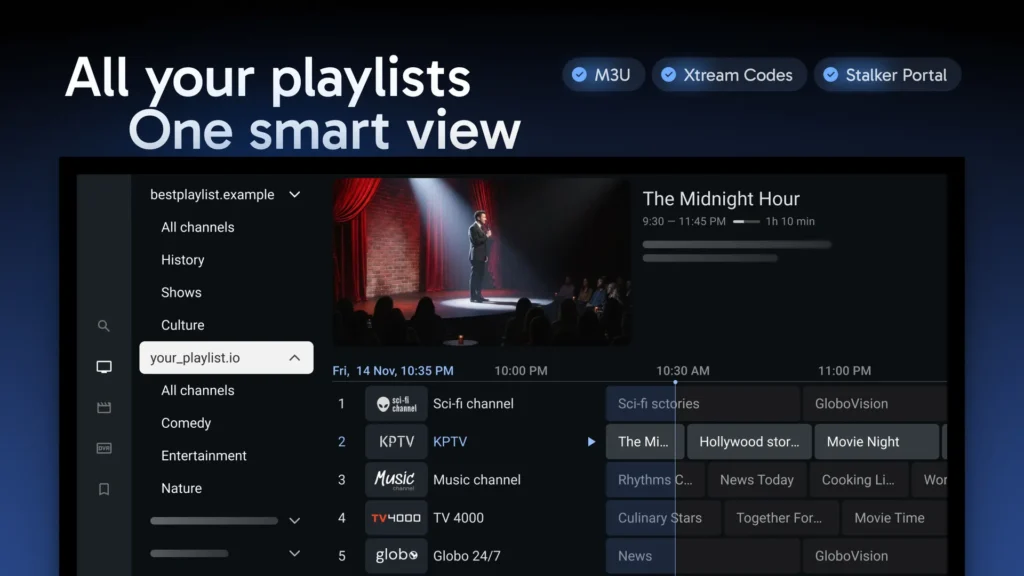
- Playlist support: M3U URL and Xtream Codes API
- Official Downloader Code (TROYPOINT Toolbox): 250931
- Direct Downloader Code (TiviMate APK): 272483
- Companion App required for Premium: Yes (Google Play Store only)
- Free trial: N/A — a permanently free tier exists with limited features
What Is TiviMate IPTV Player?
TiviMate IPTV Player is a video application that reads M3U playlists and Xtream Codes API feeds and displays the channels, categories, VOD, and EPG data in an organized grid interface. TiviMate does not host or provide any live channels on its own. TiviMate simply renders whatever streams the IPTV subscription provider supplies, which means TiviMate is fully legal software regardless of the underlying subscription.
TiviMate has been in continuous development for over a decade, and TiviMate consistently ranks as the best IPTV player for Android-based streaming devices. Users who subscribe to an IPTV service typically integrate an M3U URL or Xtream Codes URL into TiviMate to access their channels through a cleaner, faster interface than most stock provider apps deliver.
TiviMate 5.3.3 Update Notes (June 2026)
TiviMate was updated to version 5.3.3 in June 2026 with stability improvements and feature enhancements. Some users have reported issues with certain features after updating, so users whose current TiviMate installation is working well may want to postpone the update. Both TiviMate 5.3.3 and the previous stable version remain available through the TROYPOINT Toolbox, which allows easy rollback if the new version causes problems.
TiviMate Free vs TiviMate Premium
TiviMate ships with two tiers: a permanently free version and TiviMate Premium. TiviMate Premium costs $33.99 as a lifetime license and covers 5 simultaneous device connections, which makes TiviMate Premium one of the better value paid IPTV player subscriptions on the market.
TiviMate Free includes:
- M3U and Xtream Codes playback
- Basic EPG
- Single playlist support
- Standard channel navigation
TiviMate Premium unlocks the following additional features:
- Scheduled recordings
- Custom recurring recordings
- Support for multiple playlists
- Backup and restore
- UI customization
- External video player integration
- Parental controls
- Picture-in-picture playback
- Favorites management
- Catch-up TV
- Customizable EPG update intervals
- Customizable panel transparency and timeout
- Custom groups and channel management
- Manual channel sorting
- Auto-start last channel on app launch
- Auto frame rate (AFR) matching
- Channel-play reminders
Favorites management alone is often the deciding factor because TiviMate Free blocks channel favoriting behind the Premium paywall.
How to Install TiviMate on Firestick, Fire TV & Android TV
The installation process has two phases: enabling sideloading through the Downloader app, then downloading and installing the TiviMate APK. The steps below use an Amazon Fire TV Stick 4K Max, but the process works identically on all Firestick models, Fire TV Cube, and Android/Google TV boxes.
Step 1 — Enable Sideloading on Firestick or Fire TV
Firestick and Fire TV devices require Developer Options to be enabled before any sideloaded app can install.
- From the Fire TV home screen, open the search bar and search for Downloader.
- Select the Downloader app and choose Download or Get.
- Wait for the Downloader installation to finish.
- Return to Settings and open My Fire TV.
- Select About.
- Highlight Fire TV Stick (or the device name shown) and press the select button 7 times until the “You are now a developer” message appears.
- Return to My Fire TV, and Developer options will now be listed.
- Open Developer options and select Install unknown apps.
- Select Downloader and toggle it ON.
Sideloading is now enabled for the Downloader app, which allows the TiviMate APK installation.
NOTE: Android TV and Google TV boxes follow a similar process. Users on those devices should enable Unknown Sources or Install Unknown Apps for Downloader through the device Settings menu.
Step 2 — Install TiviMate Using Downloader Code 250931 or 272483
The TiviMate APK installs through the Downloader app using one of two Downloader codes.
- Open the Downloader app on the Fire TV or Android TV device.
- Click the URL bar on the Home tab.
- Enter Downloader code 250931 and click Go. This code loads the TROYPOINT Toolbox, which contains multiple TiviMate versions including 5.3.3 and the previous stable release.
- Alternatively, enter Downloader code 272483 for a direct install of the official TiviMate IPTV Player APK.
- On the TROYPOINT Toolbox page, scroll down to TiviMate and click Download.
- Wait for the TiviMate APK to download completely.
- Click Install when the installation prompt appears.
- The “Ready to launch!” confirmation will appear once installation is complete.
- Click Done.
- Return to Downloader and click Delete twice to remove the APK installation file and free up storage.
TiviMate is now installed on the Firestick, Fire TV, or Android TV device.
How to Set Up TiviMate Premium with the TiviMate Companion App
TiviMate Premium activation requires the TiviMate Companion App, which is available exclusively on the Google Play Store. TiviMate Companion App does not exist on the Amazon App Store, so Firestick users must install the Companion App through an Android phone, Android tablet, standard Android TV box with Google Play Store access, or through the BlueStacks Android emulator on a Windows PC.
Users running the true Android TV operating system on devices like the NVIDIA SHIELD must also use a separate Android phone, tablet, or BlueStacks for account creation.
Step 1 — Create a TiviMate Premium Account
- Open the Google Play Store on an Android phone, tablet, or Google Play–enabled device.
- Search for “TiviMate Companion” and select the first result.
- Click Install and wait for the Companion App to install.
- Open the TiviMate Companion App and click Account.
- Enter a username and password and select Sign up.
- Re-enter the password and click Create account.
- Choose the TiviMate Premium subscription plan (currently $33.99 lifetime for 5 devices) and enter payment details.
- Registration is complete once payment processes.
NOTE: TiviMate Premium can also be purchased directly through the official TiviMate website using Link Payment, credit card, or another supported payment method.
Step 2 — Log In to TiviMate Premium on Firestick or Android TV
- Open TiviMate on the Firestick, Fire TV, or Android TV device.
- From the home screen, select Settings.
- Choose Unlock Premium and click Next.
- Select Account.
- Enter the username and password created in the Companion App.
- Click Next.
- Enter a device name (for tracking activated devices) and click Activate.
- Click OK.
TiviMate Premium is now active on the device, and all premium features are unlocked.
Key TiviMate Features and Settings
TiviMate offers a distinctive interface that separates the app from other IPTV players. The left-side menu bar lists Playlist Categories (called Groups inside TiviMate), and multiple IPTV services can be combined into a single TiviMate installation for unified channel management.
TiviMate Remote Navigation (Firestick)
TiviMate remote controls follow a consistent pattern across Fire TV and Android TV remotes:
- Select button: Opens the selected channel
- Back button: Shows Groups or returns to the TV Guide
- Left button: Scrolls to the previous program in the EPG
- Right button: Scrolls to the next program in the EPG
- Up button: Scrolls up through channels
- Down button: Scrolls down through channels
- Rewind button: Scrolls channels up without changing the current channel
- Fast Forward button: Scrolls channels down without changing the current channel
TiviMate Groups
TiviMate Groups organize playlist categories on the left-side menu. Groups can be reordered, hidden, or removed through Settings. To edit Groups, open the TV Guide, press the Menu button (three horizontal lines) on the remote, choose Group options, then select Manage groups. Toggling a Group off hides it from the menu, and Manage positions reorders visible Groups.
TiviMate Favorites
TiviMate Favorites allow quick access to preferred channels. Favorites can be added in two ways:
- Long-press the Select button while playing a channel and choose Add to Favorites.
- From the TV Guide, press the Menu button to open batch favorite options for multiple channels at once.
Favorites management is a TiviMate Premium feature and is not available in the free tier.
TiviMate EPG (Electronic Program Guide)
The TiviMate EPG delivers the fastest and most reliable Electronic Program Guide in the IPTV player category. Recommended EPG settings:
- Past Days to Keep EPG: 1
- Update Intervals: 24 hours
- Update on app start: Off
- Update on Playlist Change: On
TiviMate Picture-in-Picture
TiviMate Picture-in-Picture keeps the current channel playing in a small overlay while the user browses other apps on the device. Picture-in-Picture activates from the full-screen mode of any live channel and is a TiviMate Premium feature.
TiviMate Parental Controls
TiviMate Parental Controls protect content behind a PIN. Settings include PIN protection for Playlists, TV Guide, Group options, and individual channels. Channel-level blocking is available through the Settings menu of any specific channel.
TiviMate Subtitles
TiviMate supports closed captioning on channels that provide subtitle streams. To enable subtitles:
- Play the preferred channel.
- Long-press the Select button to open the playback options.
- Choose CC.
- Toggle the setting from Off to Closed captions 1.
Subtitle availability varies by channel and depends on whether the IPTV provider includes CC data in the stream.
TiviMate External Video Player
TiviMate supports external video players such as MX Player and VLC, which reduces buffering on lower-end hardware. External player handoff is selectable per channel through the playback menu, and this feature is often the difference between smooth playback and constant buffering on older Firestick models.
TiviMate Recording Capabilities
TiviMate Premium includes three recording modes:
- Live recording while watching: Records the current channel from the moment recording starts.
- Live recording from the channel guide: Starts recording without opening the channel first.
- Scheduled recordings: Records specific programs from the EPG at defined times, including recurring recordings.
TiviMate recordings require a properly formatted USB drive connected to the Firestick or Android TV device. The USB drive must be formatted as FAT32 for TiviMate to write recordings to it.
To schedule a recording, long-press the Select button on any program in the channel guide, choose Custom Recording, then select New Recording and configure the channel and time window.
Beware of TiviMate Imposters and Fake IPTV Services
TiviMate does not sell or provide any live TV channels, and TiviMate is not affiliated with any IPTV service. Several fraudulent websites use the TiviMate name to sell fake “TiviMate IPTV subscriptions,” which do not exist. Any website advertising channels bundled with TiviMate is a scam.
TiviMate is only distributed through:
- The official TiviMate website
- The TiviMate Companion App on the Google Play Store
- Trusted sideloading sources such as the TROYPOINT Toolbox (Downloader code 250931) or direct APK code 272483
Payment for TiviMate Premium should only occur through the TiviMate Companion App or the official TiviMate website. Any other payment channel is fraudulent.
Similarly, modified “TiviMate Premium free” APK versions circulating online are cloned from the original TiviMate IPTV Player and often contain modified code. These modified APKs should be avoided.
Final Thoughts on Installing TiviMate IPTV Player
TiviMate remains the top-ranked IPTV player in 2026 for Firestick, Fire TV, and Android TV users, and the installation process takes under 10 minutes from start to finish. The free version of TiviMate delivers a solid live TV experience, but TiviMate Premium at $33.99 lifetime for 5 devices unlocks the features that define the app: DVR recording, favorites, picture-in-picture, external player support, and multi-playlist management.
TiviMate 5.3.3 is the current version as of July 2026, and users unsure about updating can install the previous stable version through the TROYPOINT Toolbox (Downloader code 250931) as a safe fallback. The TiviMate Companion App handles all Premium account creation and device management, and the same Premium account works across all 5 licensed devices without additional configuration.