Televizo is a lightweight, budget-friendly IPTV player that runs on Amazon Firestick, Fire TV, Android TV, Google TV, and Android mobile devices, and this guide covers exactly how to install Televizo on each supported device. This guide also explains what Televizo actually is, how much Televizo Premium costs, how to activate the 1-hour free premium trial, and how to configure an M3U URL or Xtream Codes playlist inside Televizo IPTV Player.
Televizo is available for free download directly from the official Televizo website at televizo.net, and Televizo is also available on the Google Play Store for Android TV and Android mobile devices. Firestick and Fire TV users install Televizo by sideloading the APK through the Downloader app, because Televizo is not available in the Amazon App Store.
Televizo IPTV Player Quick Facts
- Price: Free tier + Televizo Premium at $1.99/month or $11.99/year (one of the lowest prices in the IPTV player category)
- Free trial: 1-hour Televizo Premium trial + permanently free tier
- Supported devices: Amazon Firestick, Fire TV, Fire TV Cube, Android TV, Google TV, NVIDIA SHIELD, Chromecast with Google TV, Android phones and tablets
- Not available on: iOS, iPadOS, macOS, Apple TV, Windows (natively)
- Playlist support: M3U URL, Xtream Codes API
- Official download source: televizo.net (Firestick APK) and Google Play Store (Android TV, mobile)
- Amazon App Store availability: Not available (sideloading required)
- Purchase location for Televizo Premium: Google Play Store only
What Is Televizo IPTV Player?
Televizo is a video application that reads M3U playlists and Xtream Codes API feeds and displays live channels, VOD content, and EPG data through a clean, minimal interface. Televizo does not host or provide any channels. Televizo simply renders whatever streams the IPTV subscription provider supplies, which means Televizo is fully legal software regardless of the underlying subscription.
Televizo competes directly with TiviMate, Sparkle TV, and IPTV Smarters in the IPTV player category, but Televizo takes a different pricing approach. Televizo Premium costs $1.99/month or $11.99/year, which is significantly cheaper than TiviMate’s lifetime license and lower than most annual IPTV player subscriptions. This budget-friendly pricing is the main reason many viewers choose Televizo for Firestick and Android TV setups.
Televizo Free vs Televizo Premium
Televizo ships with a permanently free tier and a paid Televizo Premium upgrade. The free version handles basic IPTV playback without limitations on playlist count or channel access, and the free version is fully usable long-term. Televizo Premium adds convenience features rather than core functionality.
Televizo Free includes:
- M3U URL and Xtream Codes API playback
- Multiple playlist support
- Built-in EPG (Electronic Program Guide)
- Hardware acceleration
- List and grid view toggle
- Favorites
- Subtitles and closed captioning
- Sleep timer
- Video scaling and screen size adjustments
Televizo Premium unlocks the following additional features:
- Ad removal across the entire interface
- Parental controls with PIN protection
- Auto full-screen mode
- Backup and restore for playlists and settings
- Auto frame rate (AFR) matching for smoother playback
- Auto-update for the app itself
Televizo Premium can be tested free for 1 hour through the Televizo app itself, which provides enough time to evaluate whether the premium features are worth the subscription cost.
IMPORTANT: Televizo Premium can only be purchased through the Google Play Store. Users on Firestick and Fire TV must install Televizo on an Android phone, tablet, or Google Play–enabled Android TV box to purchase Premium, then log in with the same account on the Firestick to activate premium features.
How to Install Televizo on Firestick and Fire TV
Televizo is not available in the Amazon App Store, so Firestick, Fire TV Stick 4K, Fire TV Stick 4K Max, Fire TV Cube, and Fire TV Stick Lite users must sideload the Televizo APK through the Downloader app.
Step 1 — Install Downloader and Enable Unknown Sources
- From the Fire TV home screen, open the search bar and search for Downloader.
- Select the Downloader app and choose Download or Get.
- Wait for Downloader to finish installing.
- Return to Settings and open My Fire TV.
- Select About, highlight the device name, and press the select button 7 times until “You are now a developer” appears.
- Return to My Fire TV and open Developer options.
- Select Install unknown apps and toggle Downloader to ON.
Step 2 — Download Televizo from televizo.net
- Launch the Downloader app.
- Hover over the URL bar and press the select button on the remote to open the keyboard.
- Type televizo.net and click Go.
- The official Televizo website loads inside Downloader.
- Click APK (Amazon Only) for Firestick and Fire TV devices. This link downloads the version of Televizo compiled specifically for Amazon Fire OS.
- Wait for the Televizo APK to finish downloading.
- Click Install when the installation prompt appears.
- The “Televizo Ready to launch!” confirmation message appears once the installation completes.
- Click Done.
- Return to Downloader and click Delete twice to remove the APK installation file and free up storage.
Televizo is now installed and available in the Apps list on the Firestick or Fire TV device.
How to Install Televizo on Android TV and Google TV
Android TV, Google TV, NVIDIA SHIELD, MECOOL, Onn 4K, and Chromecast with Google TV users can install Televizo directly from the Google Play Store, which is the fastest installation method for devices with Google Play access.
- Open the Google Play Store on the Android TV or Google TV device.
- Search for “Televizo” or “Televizo IPTV Player”.
- Select the official Televizo listing (developer: Televizo).
- Click Install and wait for the installation to complete.
- Open Televizo from the home screen.
Users on Android TV devices without Google Play Store access can also follow the Firestick sideloading method above by visiting televizo.net through the Downloader app and choosing the standard Android APK instead of the Amazon-specific version.
How to Install Televizo on Android Phones and Tablets
Televizo is available on Android phones and tablets through the Google Play Store and is required for Televizo Premium purchases regardless of the primary streaming device.
- Open the Google Play Store on the Android phone or tablet.
- Search for Televizo.
- Click Install.
- Launch Televizo and complete the setup with M3U or Xtream Codes credentials.
Purchasing Televizo Premium on an Android phone or tablet automatically activates the premium features on any other device signed in with the same Google account, including Firestick installations that share the same Televizo account.
How to Set Up Televizo IPTV Player (M3U URL or Xtream Codes)
Televizo requires an M3U URL or Xtream Codes API credentials from an IPTV subscription provider before any channels appear. These credentials typically arrive in the welcome email from the IPTV service.
- Launch Televizo on the Firestick, Fire TV, or Android TV device.
- Select Don’t show again on the introduction screen and click Continue.
- Choose Create playlist.
- Select the playlist type: M3U Playlist or Xtream Codes Playlist.
- Enter the IPTV service login credentials.
- For M3U Playlist: paste the full M3U URL provided by the IPTV service.
- For Xtream Codes Playlist: enter the server URL, username, and password.
- Adjust the preferred settings on the same screen.
- Click the checkmark in the upper right corner to save.
- The Televizo home screen loads with all live channels available.
- VOD content, including Movies and TV Shows, appears in the corresponding sections if the IPTV service provides them.
How to Activate Televizo Premium (1-Hour Free Trial)
Televizo Premium offers a 1-hour free trial that activates directly inside the app without requiring payment details upfront. This trial is the fastest way to evaluate whether Premium features justify the subscription cost.
- Open Televizo on any supported device.
- Navigate to Settings or the Premium section.
- Select Try Premium Free for 1 Hour.
- Televizo Premium features (auto full-screen, parental controls, ad removal) unlock immediately for 60 minutes.
After the trial expires, Televizo Premium can be purchased on an Android device through the Google Play Store at $1.99/month or $11.99/year. Premium status then syncs to the Firestick, Fire TV, and other installations logged in with the same account.
Televizo Key Features Explained
Multiple Playlists
Televizo supports adding multiple M3U or Xtream Codes playlists in the same installation. This feature allows a single Televizo setup to combine two or more IPTV services in one interface, which provides backup access when a primary provider experiences downtime. Playlists are managed under the Televizo playlist menu, and users can rename, edit, or delete playlists individually.
List and Grid View Toggle
Televizo offers both a list view and a grid view for the channel interface. The list view displays channel names in a compact vertical format, while the grid view shows channel logos in a tile layout. Users switch between views through the Televizo settings menu, and the choice persists across sessions.
Built-in Electronic Program Guide (EPG)
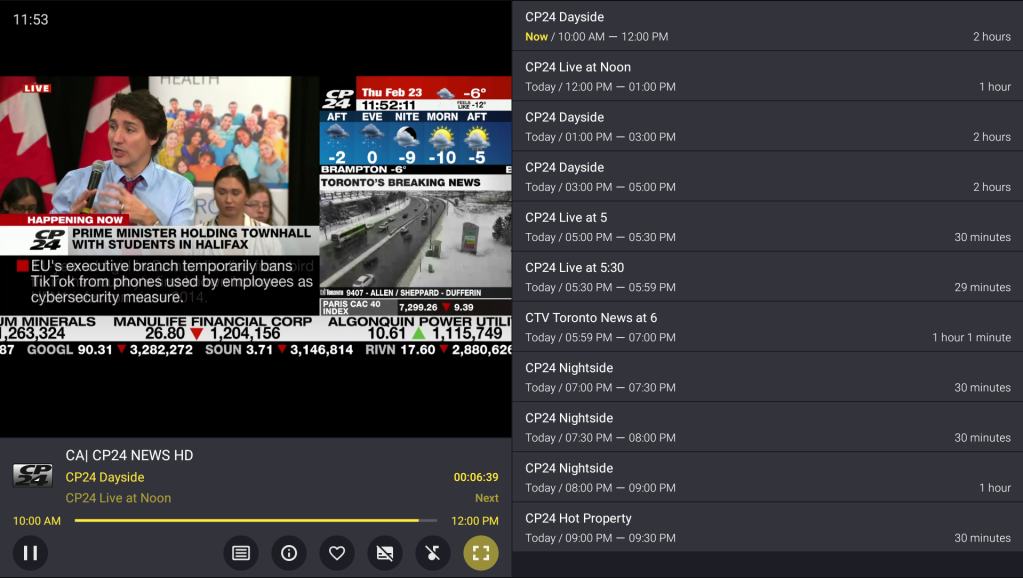
Televizo includes a functional built-in EPG that displays current and upcoming programs across all channels. The EPG auto-populates when the setup uses Xtream Codes API, and M3U URL setups can add an EPG source URL manually through the playlist settings. Televizo also displays channel and show synopsis information alongside the EPG.
Hardware Acceleration
Televizo supports hardware acceleration, which offloads video decoding to the device GPU and reduces buffering on lower-end Firestick models. Hardware acceleration is enabled by default and can be adjusted in the Televizo player settings.
Sleep Timer
Televizo includes a sleep timer that automatically stops video playback after a set duration. This feature is useful for viewers who fall asleep during long viewing sessions and want to avoid draining the device or leaving the stream running overnight.
Favorites
Televizo allows users to mark preferred channels as favorites for quick access. Favorites appear in a dedicated section on the Televizo home screen and eliminate the need to scroll through the full channel list to reach frequently watched channels.
Subtitles and Closed Captioning
Televizo supports subtitles and closed captioning on channels that provide subtitle streams. Subtitle availability depends on whether the IPTV provider includes caption data in the stream, and users toggle subtitles through the Televizo player options during playback.
Parental Controls (Premium)
Televizo Premium unlocks parental controls that restrict access to specific channels or content categories behind a PIN. This feature is only available in the paid Premium tier and does not exist in the free version.
Auto Full-Screen (Premium)
Televizo Premium automatically enters full-screen mode on channel selection, which removes the manual step of expanding the video window. This feature is a paid Premium exclusive.
Backup and Restore (Premium)
Televizo Premium includes backup and restore for playlists and settings. Users export the current configuration to a file and restore it on another device or after a fresh install, which saves reconfiguration time. This feature is Premium-only.
Televizo Additional Settings
Televizo provides several additional configuration options in the settings menu:
- Video scaling: Adjusts how streams fill the display
- Clock: Toggles the on-screen clock during playback
- Text size: Adjusts EPG and menu text size
- Screen size: Changes the display area
- Screen scale: Fine-tunes the aspect ratio
Televizo also includes an external player option, though real-world reliability of this feature has been inconsistent across devices. Users who need external player support may find that TiviMate or IPTV Smarters Pro deliver a more stable external player experience.
Televizo vs Other IPTV Players
Televizo competes with several IPTV players in the same category, and choosing between them depends on price sensitivity and feature priorities.
- Televizo vs TiviMate: TiviMate offers a more polished EPG and DVR system, but TiviMate costs $33.99 lifetime while Televizo Premium costs $11.99/year — cheaper long-term for users who prefer subscription pricing.
- Televizo vs IPTV Smarters Pro: IPTV Smarters Pro is completely free and available on more platforms (including Apple TV and iOS), while Televizo has a cleaner interface but limited to Android-based devices.
- Televizo vs Sparkle TV: Sparkle TV mirrors TiviMate’s design, while Televizo takes a more minimalist approach with lower resource requirements.
- Televizo vs Perfect Player: Perfect Player offers similar minimalism, but Televizo ships more polished visuals and receives more frequent updates.
Televizo is the best fit for users who want a functional, budget-friendly IPTV player without paying $30+ for a lifetime license and without dealing with the more complex feature set of TiviMate.
Televizo Frequently Asked Questions
What is Televizo?
Televizo is an IPTV player application that streams live channels, movies, and TV shows from any IPTV subscription service through M3U URL or Xtream Codes API integration. Televizo works on Firestick, Fire TV, Android TV, Google TV, and Android mobile devices.
Is Televizo Free?
Televizo offers a permanently free tier that handles all core IPTV playback, and Televizo Premium is available as a paid upgrade at $1.99/month or $11.99/year. A 1-hour free trial of Televizo Premium is available inside the app.
Does Televizo Have Live Channels?
Televizo does not host or provide any live channels. Televizo is only a video player and requires an active IPTV subscription that supplies an M3U URL or Xtream Codes API credentials.
Does Televizo Work on Firestick?
Televizo for Firestick works on all Fire TV models, including Fire TV Stick 4K, Fire TV Stick 4K Max, Fire TV Cube, and Fire TV Stick Lite. Televizo must be sideloaded through the Downloader app because Televizo is not available in the Amazon App Store.
Does Televizo Support Apple TV or iOS?
Televizo is not available on Apple TV, iPhone, iPad, or macOS. Users on Apple platforms should use Smarters Player Lite (IPTV Smarters) or Chillio as an alternative IPTV player.
Where Can I Buy Televizo Premium?
Televizo Premium can only be purchased through the Google Play Store on an Android phone, tablet, or Android TV device with Play Store access. The purchase then syncs to Firestick and other installations that share the same Televizo account.
Is Televizo Legal?
Televizo is fully legal software because Televizo is only a video player and does not host any content. Legality depends entirely on the underlying IPTV subscription: licensed IPTV services create a legal viewing experience, while unlicensed services do not.
Final Thoughts on Installing Televizo IPTV Player
Televizo remains one of the best budget-friendly IPTV players in 2026 for Firestick, Fire TV, Android TV, and Google TV users, and the installation process takes under 5 minutes on any supported device. Televizo for Firestick installs through the official televizo.net APK via Downloader, while Android TV and Google TV users install Televizo directly from the Google Play Store.
The free version of Televizo covers all core IPTV functionality, and Televizo Premium at $1.99/month or $11.99/year is the cheapest premium IPTV player subscription on the market. Users who value a minimalist interface, low resource usage, and budget pricing over the maximalist feature sets of TiviMate or IPTV Smarters Pro consistently choose Televizo IPTV Player for their daily IPTV setup.